Author: 3nmwucze2oyd

  • PdfTableExtractorDesktop

    PDF Table Extractor Desktop

    This repository contains a C# port of the original PDFTableExtractor with the developer’s permission. The application extracts tables from PDF files and converts them into Excel (XLSX) format.

    Features:

    • Parallel extraction: Process multiple PDFs at once.
    • Customizable settings: Configure how the app works.
    • Version checking: Keeps track of the latest version on GitHub.
    • User interface: Easily configure settings through the app’s interface.
    • Error handling: Logs any errors in an error.txt file for troubleshooting.

    Downloading & Installing

    1. Go to the Releases section and download the latest installer file.
    2. Run the installer (avoid installing to ProgramFiles).
    3. A PDFTableExtractor shortcut will appear on the Desktop.

    Usage with Example

    1. Drag & drop one or more PDFs onto the Desktop shortcut.
    2. Alternatively, right-click on the PDF and select the extract option (must be enabled in settings).
    3. A command prompt will appear, printing information about the processing.
    4. XLSX files will be created in the same directory where the PDFs were located.

    For customizing output, check out the Settings wiki page.

    Example Input & Output

    Image

    Settings

    To bring up the settings menu, start the desktop icon normally.

    • Keep pages with rows/columns: Skip exporting all pages/sheets that don’t meet the criteria.
    • Skip empty rows/columns: Different options for choosing row/column skipping methods.
    • Page naming strategy: How to name pages/sheets in the Excel file.
    • Autosize columns: Resizes created columns before saving.
    • Parallel file processing: Enables processing multiple PDFs at the same time.
    • Context menu: When turned on, an extraction option appears in the right-click menu of PDF files.

    Image

    Updating

    1. When a new version is available, a message will appear in the console saying that the local version is out of date.
    2. Go to the Releases section.
    3. Download the new installer.
    4. Uninstall the old version.
    5. Install the new version.

    Reporting Bugs

    1. Create a new issue with a descriptive title.
    2. Try to include more information, e.g., the PDF you tried to extract (if you’re allowed to), your settings, error.txt.
    3. If the expected output is wrong, demonstrate what the expected output would be and what the output of the app was.
    4. When a program error occurs, a file named error.txt gets created in the directory of the application.

    Requesting New Features

    1. Create an issue describing the feature/filter you need, giving it a descriptive name.
    2. Write a short description of what the feature/filter would do.
    3. Post screenshots of the input and the expected output.

    This C# port of the original PDFTableExtractor was created with the developer’s permission.

    Visit original content creator repository
  • airplayer

    AirPlayer

    Command-line AirPlay video client for Apple TV

    Gem Version Dependency Status Build Status Coverage Status Code Climate

    Requirements

    • OS X, Ubuntu, Arch Linux
    • Ruby 2.2 or later
    • Bundler 1.10.0 or later
    • AppleTV 2G or later
    • youtube-dl (If you want to watch YouTube)

    For Arch Linux

    nss-mdns package is required.

    $ sudo pacman -S nss-mdns

    or

    $ yaourt -S nss-mdns

    For Ubuntu

    $ sudo apt-get install rdnssd libavahi-compat-libdnssd-dev

    Installation

    RubyGems

    $ gem install airplayer

    Bundler

    $ git clone git://github.com/Tomohiro/airplayer.git
    $ cd airplayer
    $ bundle install --deployment --binstubs
    $ bin/airplayer version
    1.1.0

    Usage

    Play online video

    $ airplayer play http://heinlein.local/Movies/AKIRA.m4v
    
     Source: http://heinlein.local/misc/Movies/AKIRA.m4v
      Title: AKIRA.m4v
     Device: Apple TV (10.0.1.2)
       Time: 00:04:25 |=                                              | 3% Streaming

    Play video

    $ airplayer play '~/Movies/Trailers/007 SKYFALL.mp4'
    
     Source: http://10.0.1.6:7070
      Title: SKYFALL.mp4
     Device: Apple TV (10.0.1.2)
       Time: 00:00:20 |=====                                         | 11% Streaming

    Play all video in specific directory

    $ airplayer play ~/Movies/Trailers
    
     Source: http://10.0.1.6:7070
      Title: 007 Casino Royale.mp4
     Device: Apple TV (10.0.1.2)
       Time: 00:02:33 |==============================================| 100% Complete
    
     Source: http://10.0.1.6:7070
      Title: 007 Quantum Of Solace.mp4
     Device: Apple TV (10.0.1.2)
       Time: 00:02:01 |==============================================| 100% Complete
    
     Source: http://10.0.1.6:7070
      Title: 007 SKYFALL.mp4
     Device: Apple TV (10.0.1.2)
       Time: 00:02:36 |==============================================| 100% Complete

    Play video podcast XML

    Example: CNN video podcast

    $ airplayer play http://rss.cnn.com/services/podcasting/cnnnewsroom/rss.xml
    
     Source: http://rss.cnn.com/~r/services/podcasting/cnnnewsroom/rss/~5/z7DirHubdP0/exp-travel-insider-hilton-head-island.cnn.m4v
      Title: exp-travel-insider-hilton-head-island.cnn.m4v
     Device: Apple TV (10.0.1.2)
       Time: 00:00:44 |============                                  | 39% Streaming

    Play YouTube video

    $ airplayer play 'http://www.youtube.com/watch?v=QH2-TGUlwu4'

    Repeat play

    Repeat one

    $ airplayer play '~/Movies/Trailers/007 SKYFALL.mp4' --repeat

    Repeat all

    $ airplayer play '~/Movies/Trailers' --repeat

    Shuffle play

    $ airplayer play '~/Movies/Trailers' --shuffle

    Select Device

    If you have multiple “AirPlay” devices, specifying the device number for the following play is available on any device.

    Check the AirPlay device number

    $ airplayer devices
    0: John's Apple TV (10.0.1.2:7000) # John's Apple TV number is 0
    1: Jane's Apple TV (10.0.1.3:7000) # Jane's Apple TV number is 1

    Use --device or -d options

    $ airplayer play --device 1 '~/Movies/GHOST IN THE SHELL.mp4'

    Advanced Usage

    Register to OS X Service

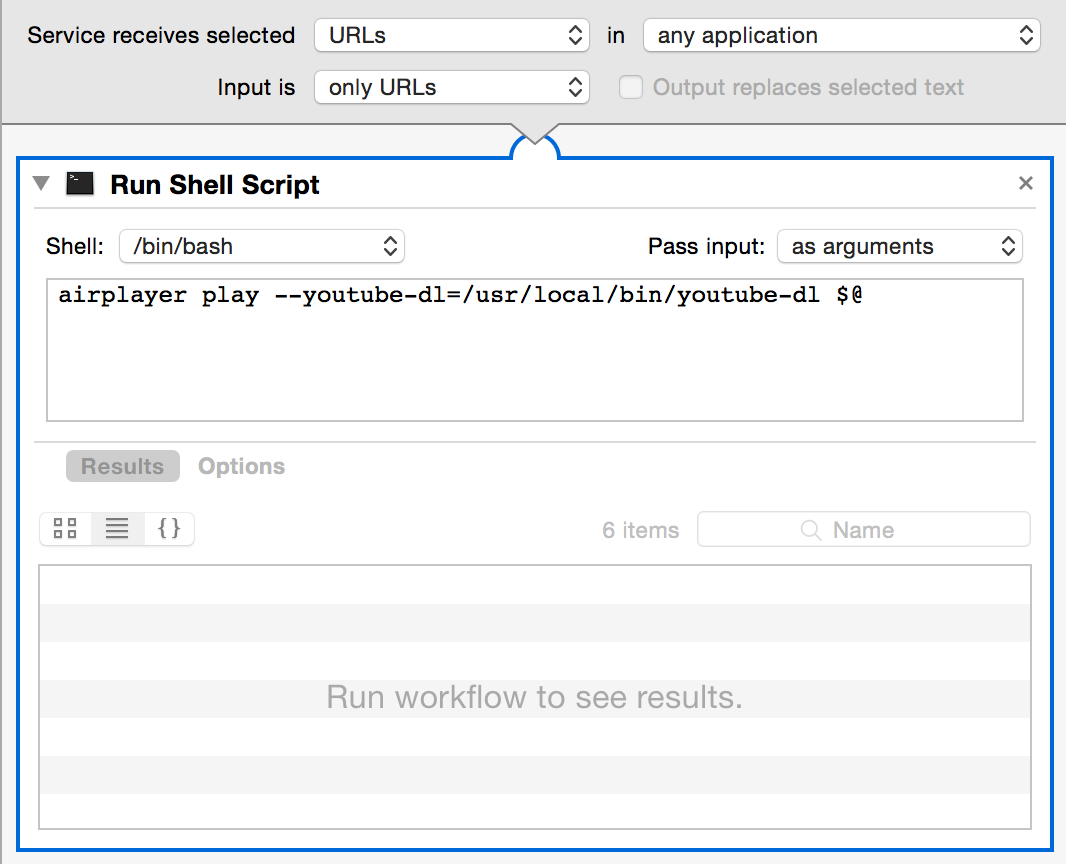
    You can create Automator Service, that opens URL from your browser in airplayer.

    automator service

    Supported MIME types

    AirPlay Overview – Configuring Your Server

    File extension MIME type Ruby mime-types
    .ts video/MP2T video/mp2t
    .mov video/quicktime video/quicktime
    .m4v video/mpeg4 video/m4v
    .mp4 video/mpeg4 application/mp4, video/mp4

    LICENSE

    © 2012 – 2016 Tomohiro TAIRA.

    This project is licensed under the MIT license. See LICENSE for details.

    Visit original content creator repository
  • estimator

    The QuantGov Estimator

    Official QuantGov Estimators

    This repository is for those who would like to create new datasets using the QuantGov platform. If you would like to find data that has been produced using the QuantGov platform, please visit http://www.quantgov.org/data.

    This repository contains all official QuantGov estimators, with each estimator stored in its own branch.

    The Generic Estimator

    The master branch of this repository is the Generic Estimator, which evaluates and trains a Random Forests Classifier. By default, the create_labels.py script generates a random label of True or False for every document; you should modify this script to use the label or labels you are actually interested in.

    This estimator uses a scikit-learn CountVectorizer to vectorize training documents as a preprocessing step. In many cases, it will be useful to modify the default parameters; see the Scikit-learn documentation for details. If vectorization will be include information about the final classes, it is necessary to move the vectorization step into the candidate model pipeline for correct cross-validation results.

    Candidate models are defined in scripts\models.py. Parameters follow the naming convention for scikit-learn grid search; see the scikit-learn documentation for details.

    The generic estimator will use the training corpus to exhaustively evaluate each combination of parameters for each candidate model, and output the results to data/model_evaluation.csv. The best scoring model will be suggested in the data/model.config file, but users can change the parameters or model based on the evaluation results (for example, using the one-standard-error rule).

    Using this Estimator

    To use or modify this estimator, clone it using git or download the archive from the QuantGov Site and unzip it on your computer.

    Requirements

    Using this estimator requires Python >= 3.4 and the make utility.

    If you are using the Anaconda Python distribution (recommended), navigate to the estimator folder and use the command conda install --file conda-requirements.txt, then the command pip install -r requirements.txt. If you are on windows, also use the command conda install --file conda-requirements-windows.txt, which will install the make utility.

    If you are not using Anaconda, use the command pip install requirements.txt. You must ensure that make is install separately.

    Visit original content creator repository

  • liana


    Liana

    The missing safety net for your bitcoins.

    About

    Liana is a simple Bitcoin wallet. Like other Bitcoin wallets you have one key which can spend the
    funds in the wallet immediately. Unlike other wallets, Liana lets you in addition specify one key
    which can only spend the coins after the wallet has been inactive for some time.

    We refer to these as the primary spending path (always accessible) and the recovery path (only
    available after some time of inactivity). You may have more than one key in either the primary or
    the recovery path (multisig). You may have more than one recovery path.

    Here is an example of a Liana wallet configuration:

    • Owner’s key (can always spend)
    • Any 2 keys from the owner’s spouse and two kids (after 1 year)
    • A third party, in case all else failed
      (after 1 year and 3 months)

    The lockup period is enforced onchain by the Bitcoin network. This is achieved by leveraging
    timelock capabilities of Bitcoin smart contracts (Script).

    Liana can be used for trustless inheritance, loss protection or safer backups. Visit
    our website for more information.

    Usage

    Liana is available on Windows, Mac and Linux. To install and start using it see
    doc/USAGE.md. A more accessible version of Liana is also available as a web
    application here.

    If you just want to quickly try out Liana on Bitcoin Signet, see doc/TRY.md.

    Hacking on Liana

    Liana is an open source project. It is hosted at Github.
    Contributions are very welcome. See here for guidelines. Most regular
    contributors hang out on our Discord. Join us there if you have any
    question about contributing.

    Liana is separated in two main components: the daemon and the Graphical User Interface.

    Liana daemon

    The daemon contains the core logic of the wallet. It is both a library (a Rust crate) that exposes a
    command interface and a standalone UNIX daemon that exposes a JSONRPC API through a Unix Domain
    Socket.

    The code for the daemon can be found in the liana folder.

    Liana GUI

    The GUI contains both an installer that guides a user through setting up a Liana wallet, as well as
    a graphical interface to the daemon using the iced library.

    The code for the GUI can be found in the liana-gui folder.

    Security

    See SECURITY.md for details about reporting a security vulnerability or any bug
    that could potentially impact the security of users’ funds.

    License

    Released under the BSD 3-Clause Licence. See the LICENCE file.

    Visit original content creator repository

  • array-functions

    Luminova Array Procedural Functions

    A lightweight utility package for array operations offering procedural functions like array_find, array_all, and more. These functions are already supported in PHP 8.1 and later. This package provide backward compatibility for PHP 8.0.


    Install via Composer

    Recommend installation method:

    composer require luminovang/array-functions

    Include File

    You can also use the function in another projects.

    include_once __DIR__ . '/vendor/luminovang/array-functions/src/ArrayFuncs.php;';

    Importing the Functions

    You can import multiple functions at once using the use function syntax with braces around the function names:

    use function Luminova\Procedural\ArrayFunctions\{
       array_find, 
       array_find_key, 
       array_any, 
       array_all
    };

    Importing a Specific Function:

    To import a specific function, such as array_find, use the following syntax:

    use function Luminova\Procedural\ArrayFunctions\array_find;

    Example Usage

    Finding an Element in an Array

    The array_find function allows you to find the first element in an array that satisfies a given condition specified in a callback.

    $result = array_find([1, 2, 3, 4, 5], fn(int $value) => $value > 3);
    
    echo $result; // Output: 4

    In this example, array_find returns the first element greater than 3, which is 4.


    Finding the Key of an Element in an Array

    The array_find_key function searches for the first key where the corresponding value meets the given condition.

    $result = array_find_key(['apple', 'banana', 'cherry'], fn(string $value) => $value === 'banana');
    
    echo $result; // Output: 1

    Here, array_find_key finds the key of ‘banana’, which is 1.

    Another Example

    Find key using str_starts_with.

    $result = array_find_key(
       ['java' => 1, 'php' => 2, 'swift' => 3], 
       fn(int $value, string $key) => str_starts_with($key, 'p')
    );
    
    echo $result; // Output: php

    In this case, array_find_key returns the key 'php', where the key starts with 'p'.


    Checking If All Elements Meet a Condition

    The array_all function checks if all elements in the array satisfy the condition defined in the callback.

    $result = array_all([2, 4, 6], fn(int $value) => $value % 2 === 0);
    echo $result; // Output: true

    In this example, array_all returns true because all elements in the array are even numbers.


    Checking If Any Element Meets a Condition

    The array_any function checks if at least one element in the array meets the condition specified in the callback.

    $result = array_any([1, 2, 3], fn(int $value) => $value > 2);
    echo $result; // Output: true

    In this case, array_any returns true because one element (3) is greater than 2.

    Visit original content creator repository

  • rust-huffman-compress

    huffman-compress

    Huffman compression given a probability distribution over arbitrary symbols.

    Build Status crates.io docs.rs No Maintenance Intended

    Alternatives

    This project has limited real-world utility. It may be useful to experiment with or learn about Huffman coding (for example, when working on bespoke chess game compression for lichess.org), but there are better entropy coders (both in terms of compression ratio and performance) and better implementations.

    See constriction for composable entropy coders, models and streams.

    See arcode for a standalone implementation of arithmetic coding.

    Examples

    use std::iter::FromIterator;
    use std::collections::HashMap;
    use bit_vec::BitVec;
    use huffman_compress::{CodeBuilder, Book, Tree};
    
    let mut weights = HashMap::new();
    weights.insert("CG", 293);
    weights.insert("AG", 34);
    weights.insert("AT", 4);
    weights.insert("CT", 4);
    weights.insert("TG", 1);
    
    // Construct a Huffman code based on the weights (e.g. counts or relative
    // frequencies).
    let (book, tree) = CodeBuilder::from_iter(weights).finish();
    
    // More frequent symbols will be encoded with fewer bits.
    assert!(book.get("CG").map_or(0, |cg| cg.len()) <
            book.get("AG").map_or(0, |ag| ag.len()));
    
    // Encode some symbols using the book.
    let mut buffer = BitVec::new();
    let example = vec!["AT", "CG", "AT", "TG", "AG", "CT", "CT", "AG", "CG"];
    for symbol in &example {
        book.encode(&mut buffer, symbol);
    }
    
    // Decode the symbols using the tree.
    let decoded: Vec<&str> = tree.decoder(&buffer).collect();
    assert_eq!(decoded, example);

    Documentation

    Read the documentation

    Changelog

    • 0.6.1
      • Fix deprecation warning and remove #[deny(warnings)] (a future compatibility hazard in libraries).
    • 0.6.0
      • Update to bit-vec 0.6.
    • 0.5.0
      • Update to bit-vec 0.5.
    • 0.4.0
      • Renamed Tree::decoder() to Tree::unbounded_decoder() to avoid surprises. A new Tree::decoder() takes the maximum number of symbols to decode.
      • No longer reexporting Saturating from num-traits.
    • 0.3.2
      • Preallocate arena space for Huffman tree.
    • 0.3.1
      • Update num-traits to 0.2 (semver compatible).
    • 0.3.0
      • Introduce CodeBuilder.
      • Changes tie breaking order.
    • 0.2.0
      • Allow initialization from iterators without creating a HashMap. Thanks @mernen.
      • Require K: Ord instead of K: Hash + Eq for symbols and switch Book internals from HashMap to BTreeMap.
      • Specify stability guarantees.
    • 0.1.1
      • Expose more methods on Book.
    • 0.1.0
      • Initial release.

    License

    huffman-compress is dual licensed under the Apache 2.0 and MIT license, at your option.

    Visit original content creator repository
  • retrieve-data-from-Kafka-with-MongoDB

    Retrieve data from Kafka with MongoDB

    LinkedIn

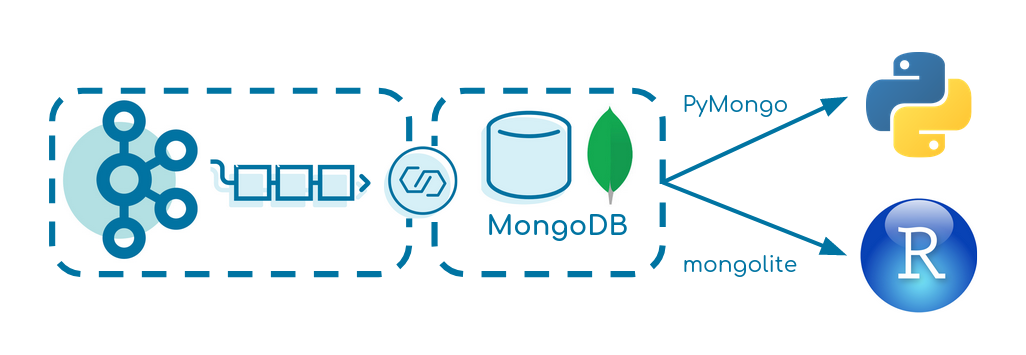
    This small tutorial creates a data pipeline from Apache Kafka over MongoDB into R or Python. It focuses on simplicity and can be seen as a baseline for similar projects.

    Prerequisites

    Set up

    docker-compose up -d
    

    It starts:

    • Zookeeper
    • Kafka Broker
    • Kafka Producer
      • built docker image executing fat JAR
    • Kafka Connect
    • MongoDB
    • RStudio
    • Jupyter Notebook

    Kafka Producer

    The Kafka Producer produces fake events of a driving truck into the topic truck-topic in JSON format every two seconds. Verify that data is produced correctly:

    docker-compose exec broker bash
    kafka-console-consumer --bootstrap-server broker:9092 --topic truck-topic
    

    Kafka Connect

    We use Kafka Connect to transfer the data from Kafka to MongoDB. Verify that the MongoDB Source and Sink Connector is added to Kafka Connect correctly:

    curl -s -XGET http://localhost:8083/connector-plugins | jq '.[].class'
    

    Start the connector:

    curl -X POST -H "Content-Type: application/json" --data @MongoDBConnector.json http://localhost:8083/connectors | jq
    

    Verify that the connector is up and running:

    curl localhost:8083/connectors/TestData/status | jq
    

    MongoDB

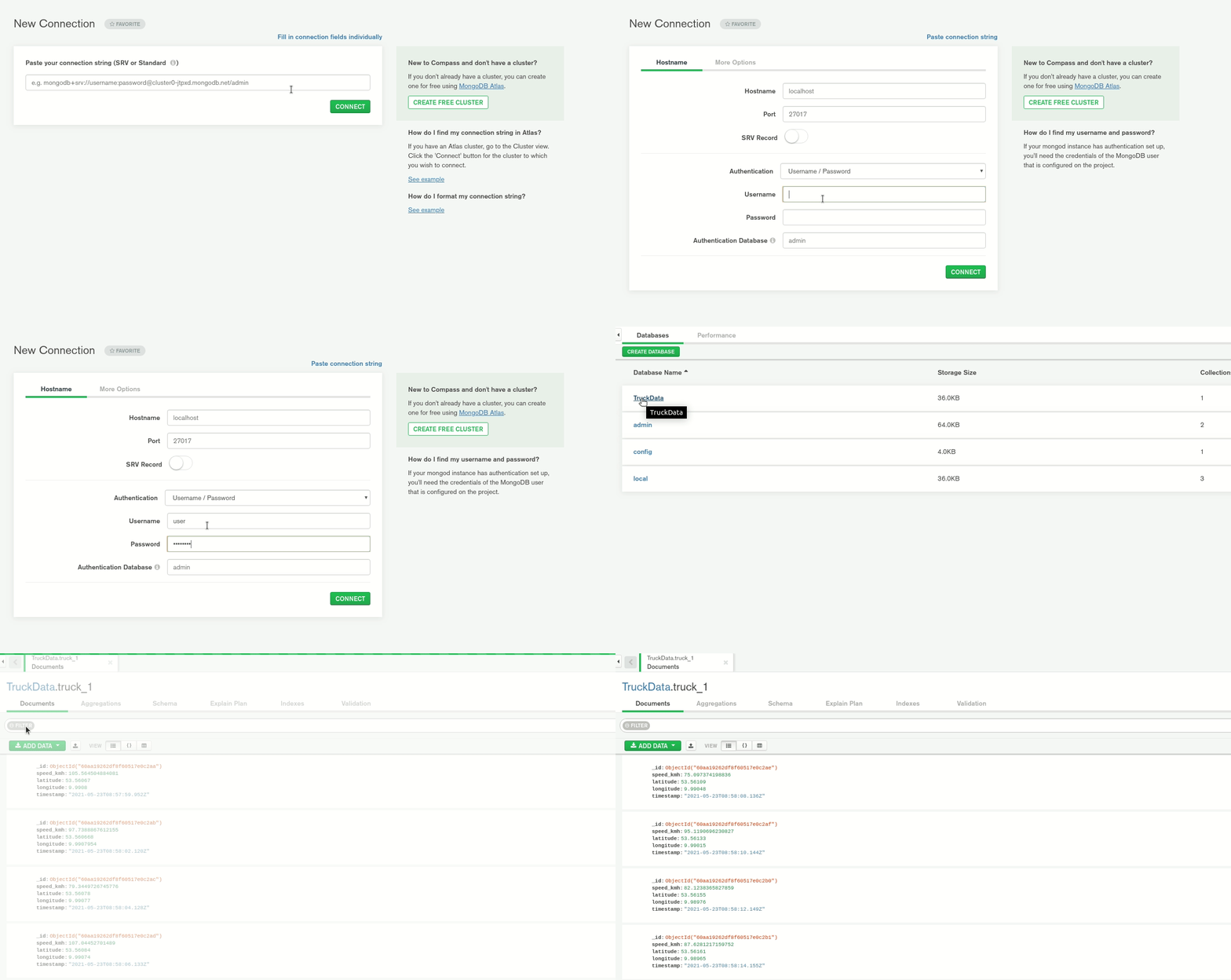
    Start MongoDB Compass and create a new connection with:

    username: user
    password: password
    authentication database: admin
    or
    URI: mongodb://user:password@localhost:27017/admin
    

    You should see a database TruckData with a collection truck_1 having data stored.

    RStudio

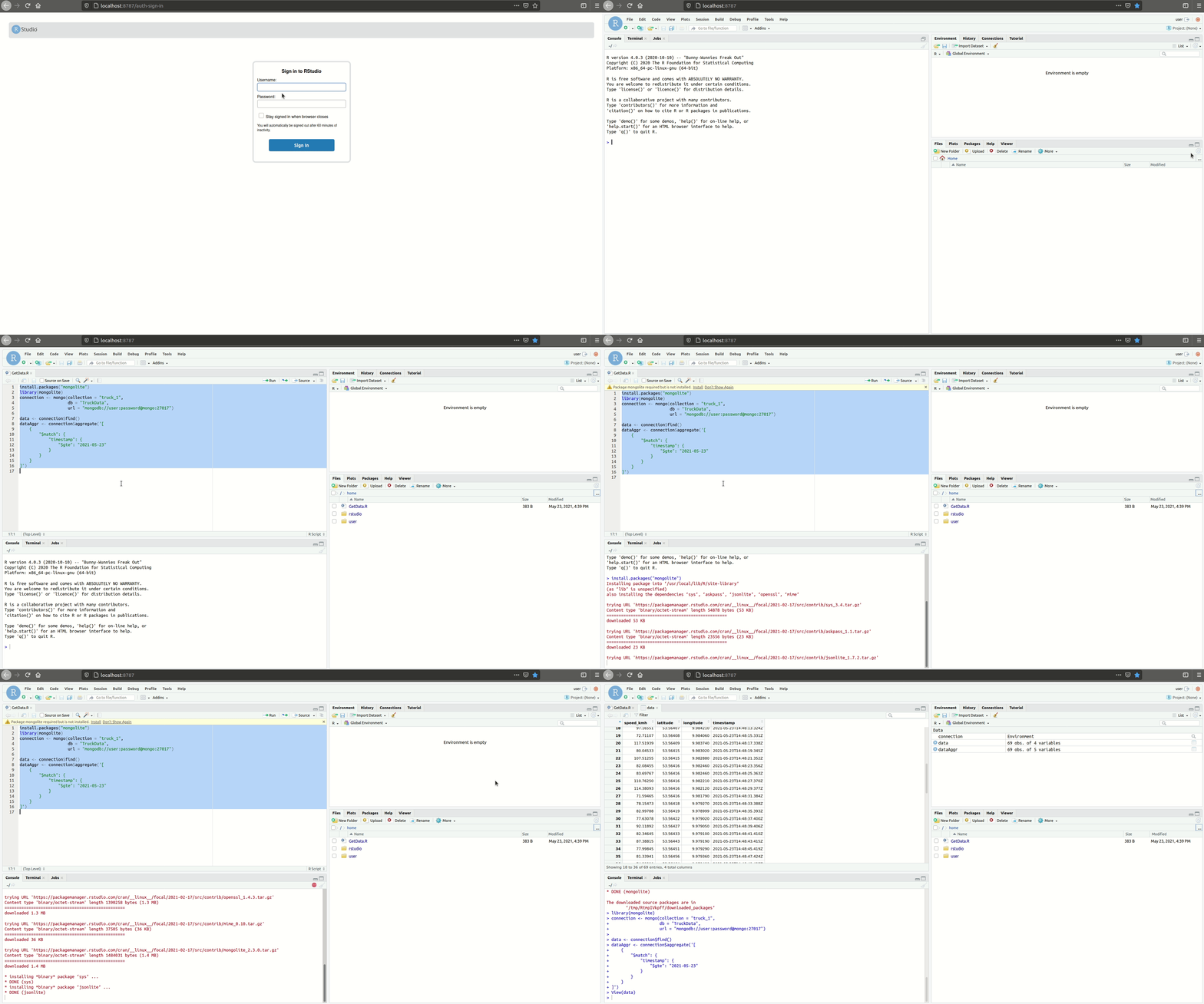
    Open RStudio via:

    localhost:8787
    

    The username is user and password password.

    Under /home you can run GetData.R. It connects to MongoDB using the package mongolite and requests the data.

    Python

    Get Jupyter Notebooks’ URL:

    docker logs jupyter
    

    Under /work you can run the Jupyter notebook using the distribution PyMongo.

    Sources

    Visit original content creator repository
  • ng-extract-i18n-merge

    npm Coverage Status CodeQL

    Angular extract i18n and merge

    This extends Angular CLI to improve the i18n extraction and merge workflow. New/removed translations are added/removed from the target translation files and translation states are managed. Additionally, translation files are normalized (whitespace, stable sort) so that diffs are easy to read (and translations in PRs might actually get reviewed 😉 ).

    Tip

    If you’d like to keep your translation process simple and rather validate translations, then waiting for actual translations, I’d like you to check out doloc.io.

    Created by the maintainer of ng-extract-i18n-merge (@daniel-sc), it integrates seamlessly with this library (see here) and provides instant translations on extraction!

    Expect great translations!

    Install

    Prerequisites: i18n setup with defined target locales in angular.json – as documented here.

    ng add ng-extract-i18n-merge

    Upgrade from 1.x.x to 2.0.0

    Run ng update ng-extract-i18n-merge@2 to upgrade from v1 to v2. This migration switches to Angular’s built-in extract-i18n builder and changes some defaults (see breaking changes below).

    If you plan to upgrade from v1 straight to v3 you must first upgrade to v2 using the command above and then run ng update ng-extract-i18n-merge again for the v3 update.

    Breaking changes:

    • Now this plugin uses the default Angular extract-i18n target – so you can simply run ng extract-i18n.
    • Default sort is now stableAppendNew (was idAsc).
    • Leading/trailing whitespaces are normalized (collapsed to one space) but not completely trimmed.
    • The provided npm run script was removed (you can create your own if needed).

    Upgrade from 2.x.x to 3.0.0

    Run ng update ng-extract-i18n-merge to update to v3.0.0 using the Angular update mechanism. This release drops support for Angular 19 and older. The defaults for prettyNestedTags and sort changed to false and "stableAlphabetNew" respectively. builderI18n now defaults to @angular/build:extract-i18n instead of @angular-devkit/build-angular:extract-i18n. During ng update existing builder configurations are updated to keep the previous behaviour (except for builderI18n, where the new default is best for most setups).

    Usage

    ng extract-i18n # yes, same as before - this replaces the original builder

    Configuration

    In your angular.json the target extract-i18n that can be configured with the following options:

    Name Default Description
    buildTarget Inferred from current setup by ng add A build builder target to extract i18n messages in the format of project:target[:configuration]. See https://angular.io/cli/extract-i18n#options
    format Inferred from current setup by ng add Any of xlf, xlif, xliff, xlf2, xliff2
    outputPath Inferred from current setup by ng add Path to folder containing all (source and target) translation files.
    targetFiles Inferred from current setup by ng add Filenames (relative to outputPath of all target translation files (e.g. ["messages.fr.xlf", "messages.de.xlf"]).
    sourceLanguageTargetFile null If this is set (to one of the targetFiles), new translations in that target file will be set to state="final" (instead of default state="new"). This file can be used to manage changes to the source texts: when a translator updates the target, this tool will hint the developer to update the code occurrences.
    sourceFile messages.xlf. ng add tries to infer non default setups. Filename (relative to outputPath of source translation file (e.g. "translations-source.xlf").
    removeIdsWithPrefix [] List of prefix strings. All translation units with matching id attribute are removed. Useful for excluding duplicate library translations. Cannot be used in combination with includeIdsWithPrefix.
    includeIdsWithPrefix [] List of prefix strings. When non-empty, only translations units with matching id are included. Useful for extracting translations of a single library in a multi-library project. Cannot be used in combination with removeIdsWithPrefix.
    fuzzyMatch true Whether translation units without matching IDs are fuzzy matched by source text.
    resetTranslationState true Reset the translation state to new/initial for new/changed units.
    prettyNestedTags false If source/target only contains xml nodes (interpolations, nested html), true formats these with line breaks and indentation. false keeps the original angular single line format. Note: while true was the historic implementation, it is not recommended, as it adds whitespace between tags that had no whitespace in between and increases bundle sizes.
    selfClosingEmptyTargets true If false empty target nodes are non self-closing.
    sortNestedTagAttributes false Attributes of xml nodes (interpolations, nested html) in source/target/meaning/description can be sorted for normalization.
    collapseWhitespace true Collapsing of multiple whitespaces/line breaks in translation sources and targets. This handles changed leading/trailing whitespaces intelligently – i.e. updates the target accordingly without resetting the translation state when only leading/trailing whitespace was changed.
    trim false Trim translation sources and targets.
    includeContext false Whether to include the context information (like notes) in the translation files. This is useful for sending the target translation files to translation agencies/services. When sourceFileOnly, the context is retained only in the sourceFile.
    includeContextLineNumber true If includeContext has been included allow the inclusion of line number to be optional. This can help reduce noise in the committed xlf files for strings that have not changed but their line number was shifted due to other changes in the file.
    includeMeaningAndDescription true Whether to include the meaning and description information in the translation files.
    newTranslationTargetsBlank false When false (default) the “target” of new translation units is set to the “source” value. When true, an empty string is used. When 'omit', no target element is created.
    sort "stableAlphabetNew" Sorting of all translation units in source and target translation files. Supported:
    "idAsc" (sort by translation IDs),
    "stableAppendNew" (keep existing sorting, append new translations at the end),
    "stableAlphabetNew" (keep existing sorting, sort new translations next to alphabetical close IDs).
    builderI18n "@angular/build:extract-i18n" The builder to use for i18n extraction. Any custom builder should handle the same options as the default angular builder (buildTarget, outputPath, outFile, format, progress).
    verbose false Extended/debug output – it is recommended to use this only for manual debugging.

    Contribute

    Feedback and PRs always welcome 🙂

    Before developing complex changes, I’d recommend opening an issue to discuss whether the indented goals match the scope of this package.

    Visit original content creator repository
  • VirusTotalApi

    VirusTotal public and private APIv2 Full support – VT APIv3

    • My pypi VT package was transfered to VirusTotal ownership

    Before using the tool you must set your api key in one of this file or you can start without creating it and you will be prompted to provide the data:

    • Home Directory:

      • ~.vtapi, ~vtapi.conf
    • or current directory where vt script placed

      • .vtapi, vtapi.conf
    • ~.vtapi file content:

    [vt]
    apikey=your-apikey-here
    type=public
    intelligence=False
    #coma separated engine list, can be empty
    engines=
    timeout=60
    # as for weblogin, this only required for rule management
    username=
    password=
    • your type of api access, if private: type=private, if public, you can leave it empty, it will be automatically recognized as public
    • if you have access to VT Intelligence, you need set intelligence=True

    Dependencies:

    • requests
    • texttable
    • python-dateutil

    These can be installed via PIP or a package manager.
    Example of installing all dependencies using pip:

    pip install -r requirements.txt
    • Thanks to @kellewic and @urbanski
    • Special thanks to @Seifreed for testing and reporting bugs

    Example of usage as library can be found here

    Few public API functions taken from Chris Clark script
    And finally has been added full public and private API support by Andriy Brukhovetskyy (doomedraven)

    Small manual with examples
    http://www.doomedraven.com/2013/11/script-virustotal-public-and-private.html

    • BEAR IN MIND THIS IS AN OLD EXAMPLE, use -h for current help

    vt -h
    usage: value [-h] [-fi] [-udb USERDB] [-fs] [-f] [-fr] [-u] [-ur] [-d] [-i]
                 [-w] [-s] [-si] [-et] [-rai] [-itu] [-cw] [-dep] [-eo] [-snr]
                 [-srct] [-tir] [-wir] [-rbgi] [-rbi] [-agi] [-dbc] [-ac] [-gc]
                 [--get-comments-before DATE] [-v] [-j] [--csv] [-rr] [-rj] [-V]
                 [-r] [--delete] [--date DATE] [--period PERIOD] [--repeat REPEAT]
                 [--notify-url NOTIFY_URL] [--notify-changes-only] [-wh] [-wht]
                 [-pdns] [--asn] [-aso] [--country] [--subdomains]
                 [--domain-siblings] [-cat] [-alc] [-alk] [-opi] [--drweb-cat]
                 [-adi] [-wdi] [-tm] [-wt] [-bd] [-wd] [-du] [--pcaps] [--samples]
                 [-dds] [-uds] [-dc] [-uc] [-drs] [-urs] [-pe]
                 [-esa SAVE_ATTACHMENT] [-peo] [-bh] [-bn] [-bp] [-bs] [-dl]
                 [-nm NAME] [-dt DOWNLOAD_THREADS] [--pcap] [--clusters]
                 [--distribution-files] [--distribution-urls] [--before BEFORE]
                 [--after AFTER] [--reports] [--limit LIMIT] [--allinfo] [--rules]
                 [--list] [--create FILE] [--update FILE] [--retro FILE]
                 [--delete_rule DELETE_RULE] [--share]
                 [--update_ruleset UPDATE_RULESET] [--disable DISABLE]
                 [--enable ENABLE]
                 [value [value ...]]
    
    Scan/Search/ReScan/JSON parse
    
    positional arguments:
      value                 Enter the Hash, Path to File(s) or Url(s)
    
    optional arguments:
      -h, --help            show this help message and exit
      -fi, --file-info      Get PE file info, all data extracted offline, for work
                            you need have installed PEUTILS library
      -udb USERDB, --userdb USERDB
                            Path to your userdb file, works with --file-info
                            option only
      -fs, --file-search    File(s) search, this option, don't upload file to
                            VirusTotal, just search by hash, support linux name
                            wildcard, example: /home/user/*malware*, if file was
                            scanned, you will see scan info, for full scan report
                            use verbose mode, and dump if you want save already
                            scanned samples
      -f, --file-scan       File(s) scan, support linux name wildcard, example:
                            /home/user/*malware*, if file was scanned, you will
                            see scan info, for full scan report use verbose mode,
                            and dump if you want save already scanned samples
      -fr, --file-scan-recursive
                            Recursive dir walk, use this instead of --file-scan if
                            you want recursive
      -u, --url-scan        Url scan, support space separated list, Max 4 urls (or
                            25 if you have private api), but you can provide more
                            urls, for example with public api, 5 url - this will
                            do 2 requests first with 4 url and other one with only
                            1, or you can specify file filename with one url per
                            line
      -ur, --url-report     Url(s) report, support space separated list, Max 4 (or
                            25 if you have private api) urls, you can use --url-
                            report --url-scan options for analyzing url(s) if they
                            are not in VT data base, read preview description
                            about more then max limits or file with urls
      -d, --domain-info     Retrieves a report on a given domain (PRIVATE API
                            ONLY! including the information recorded by
                            VirusTotal's Passive DNS infrastructure)
      -i, --ip-info         A valid IPv4 address in dotted quad notation, for the
                            time being only IPv4 addresses are supported.
      -w, --walk            Work with domain-info, will walk through all detected
                            ips and get information, can be provided ip parameters
                            to get only specific information
      -s, --search          A md5/sha1/sha256 hash for which you want to retrieve
                            the most recent report. You may also specify a scan_id
                            (sha256-timestamp as returned by the scan API) to
                            access a specific report. You can also specify a space
                            separated list made up of a combination of hashes and
                            scan_ids Public API up to 4 items/Private API up to 25
                            items, this allows you to perform a batch request with
                            one single call.
      -si, --search-intelligence
                            Search query, help can be found here -
                            https://www.virustotal.com/intelligence/help/
      -et, --email-template
                            Table format template for email
      -ac, --add-comment    The actual review, you can tag it using the "#"
                            twitter-like syntax (e.g. #disinfection #zbot) and
                            reference users using the "@" syntax (e.g.
                            @VirusTotalTeam). supported hashes MD5/SHA1/SHA256
      -gc, --get-comments   Either a md5/sha1/sha256 hash of the file or the URL
                            itself you want to retrieve
      --get-comments-before DATE
                            A datetime token that allows you to iterate over all
                            comments on a specific item whenever it has been
                            commented on more than 25 times. Token format
                            20120725170000 or 2012-07-25 17 00 00 or 2012-07-25
                            17:00:00
      -v, --verbose         Turn on verbosity of VT reports
      -j, --dump            Dumps the full VT report to file (VTDL{md5}.json), if
                            you (re)scan many files/urls, their json data will be
                            dumped to separated files
      --csv                 Dumps the AV's detections to file (VTDL{scan_id}.csv)
      -rr, --return-raw     Return raw json, in case if used as library and want
                            parse in other way
      -rj, --return-json    Return json with parts activated, for example -p for
                            passive dns, etc
      -V, --version         Show version and exit
    
    All information related:
      -rai, --report-all-info
                            If specified and set to one, the call will return
                            additional info, other than the antivirus results, on
                            the file being queried. This additional info includes
                            the output of several tools acting on the file (PDFiD,
                            ExifTool, sigcheck, TrID, etc.), metadata regarding
                            VirusTotal submissions (number of unique sources that
                            have sent the file in the past, first seen date, last
                            seen date, etc.), and the output of in-house
                            technologies such as a behavioural sandbox.
      -itu, --ITW-urls      In the wild urls
      -cw, --compressedview
                            Contains information about extensions, file_types,
                            tags, lowest and highest datetime, num children
                            detected, type, uncompressed_size, vhash, children
      -dep, --detailed-email-parents
                            Contains information about emails, as Subject, sender,
                            receiver(s), full email, and email hash to download it
      -eo, --email-original
                            Will retrieve original email and process it
      -snr, --snort         Get Snort results
      -srct, --suricata     Get Suricata results
      -tir, --traffic-inspection
                            Get Traffic inspection info
      -wir, --wireshark-info
                            Get Wireshark info
      -rbgi, --rombios-generator-info
                            Get RomBios generator info
      -rbi, --rombioscheck-info
                            Get RomBiosCheck info
      -agi, --androidguard-info
                            Get AndroidGuard info
      -dbc, --debcheck-info
                            Get DebCheck info, also include ios IPA
    
    Rescan options:
      -r, --rescan          Allows you to rescan files in VirusTotal's file store
                            without having to resubmit them, thus saving
                            bandwidth, support space separated list, MAX 25
                            hashes, can be local files, hashes will be generated
                            on the fly, support linux wildmask
      --delete              A md5/sha1/sha256 hash for which you want to delete
                            the scheduled scan
      --date DATE           A Date in one of this formats (example: 20120725170000
                            or 2012-07-25 17 00 00 or 2012-07-25 17:00:00) in
                            which the rescan should be performed. If not specified
                            the rescan will be performed immediately.
      --period PERIOD       Period in days in which the file should be rescanned.
                            If this argument is provided the file will be
                            rescanned periodically every period days, if not, the
                            rescan is performed once and not repeated again.
      --repeat REPEAT       Used in conjunction with period to specify the number
                            of times the file should be rescanned. If this
                            argument is provided the file will be rescanned the
                            given amount of times, if not, the file will be
                            rescanned indefinitely.
    
    File scan/Rescan shared options:
      --notify-url NOTIFY_URL
                            An URL where a POST notification should be sent when
                            the scan finishes.
      --notify-changes-only
                            Used in conjunction with --notify-url. Indicates if
                            POST notifications should be sent only if the scan
                            results differ from the previous one.
    
    Domain/IP shared verbose mode options, by default just show resolved IPs/Passive DNS:
      -wh, --whois          Whois data
      -wht, --whois-timestamp
                            Whois timestamp
      -pdns, --resolutions  Passive DNS resolves
      --asn                 ASN number
      -aso, --as-owner      AS details
      --country             Country
      --subdomains          Subdomains
      --domain-siblings     Domain siblings
      -cat, --categories    Categories
      -alc, --alexa-cat     Alexa category
      -alk, --alexa-rank    Alexa rank
      -opi, --opera-info    Opera info
      --drweb-cat           Dr.Web Category
      -adi, --alexa-domain-info
                            Just Domain option: Show Alexa domain info
      -wdi, --wot-domain-info
                            Just Domain option: Show WOT domain info
      -tm, --trendmicro     Just Domain option: Show TrendMicro category info
      -wt, --websense-threatseeker
                            Just Domain option: Show Websense ThreatSeeker
                            category
      -bd, --bitdefender    Just Domain option: Show BitDefender category
      -wd, --webutation-domain
                            Just Domain option: Show Webutation domain info
      -du, --detected-urls  Just Domain option: Show latest detected URLs
      --pcaps               Just Domain option: Show all pcaps hashes
      --samples             Will activate -dds -uds -dc -uc -drs -urs
      -dds, --detected-downloaded-samples
                            Domain/Ip options: Show latest detected files that
                            were downloaded from this ip
      -uds, --undetected-downloaded-samples
                            Domain/Ip options: Show latest undetected files that
                            were downloaded from this domain/ip
      -dc, --detected-communicated
                            Domain/Ip Show latest detected files that communicate
                            with this domain/ip
      -uc, --undetected-communicated
                            Domain/Ip Show latest undetected files that
                            communicate with this domain/ip
      -drs, --detected-referrer-samples
                            Undetected referrer samples
      -urs, --undetected-referrer-samples
                            Undetected referrer samples
    
    Process emails:
      -pe, --parse-email    Parse email, can be string or file
      -esa SAVE_ATTACHMENT, --save-attachment SAVE_ATTACHMENT
                            Save email attachment, path where to store
      -peo, --parse-email-outlook
                            Parse outlook .msg, can be string or file
    
    Behaviour options:
      -bh, --behaviour      The md5/sha1/sha256 hash of the file whose dynamic
                            behavioural report you want to retrieve. VirusTotal
                            runs a distributed setup of Cuckoo sandbox machines
                            that execute the files we receive. Execution is
                            attempted only once, upon first submission to
                            VirusTotal, and only Portable Executables under 10MB
                            in size are ran. The execution of files is a best
                            effort process, hence, there are no guarantees about a
                            report being generated for a given file in our
                            dataset. a file did indeed produce a behavioural
                            report, a summary of it can be obtained by using the
                            file scan lookup call providing the additional HTTP
                            POST parameter allinfo=1. The summary will appear
                            under the behaviour-v1 property of the additional_info
                            field in the JSON report.This API allows you to
                            retrieve the full JSON report of the files execution
                            as outputted by the Cuckoo JSON report encoder.
      -bn, --behavior-network
                            Show network activity
      -bp, --behavior-process
                            Show processes
      -bs, --behavior-summary
                            Show summary
    
    Download options:
      -dl, --download       The md5/sha1/sha256 hash of the file you want to
                            download or txt file with .txt extension, with hashes,
                            or hash and type, one by line, for example: hash,pcap
                            or only hash. Will save with hash as name, can be
                            space separated list of hashes to download
      -nm NAME, --name NAME
                            Name with which file will saved when download it
      -dt DOWNLOAD_THREADS, --download-threads DOWNLOAD_THREADS
                            Number of simultaneous downloaders
    
    Additional options:
      --pcap                The md5/sha1/sha256 hash of the file whose network
                            traffic dump you want to retrieve. Will save as
                            hash.pcap
      --clusters            A specific day for which we want to access the
                            clustering details, example: 2013-09-10
      --distribution-files  Timestamps are just integer numbers where higher
                            values mean more recent files. Both before and after
                            parameters are optional, if they are not provided the
                            oldest files in the queue are returned in timestamp
                            ascending order.
      --distribution-urls   Timestamps are just integer numbers where higher
                            values mean more recent urls. Both before and after
                            parameters are optional, if they are not provided the
                            oldest urls in the queue are returned in timestamp
                            ascending order.
    
    Distribution options:
      --before BEFORE       File/Url option. Retrieve files/urls received before
                            the given timestamp, in timestamp descending order.
      --after AFTER         File/Url option. Retrieve files/urls received after
                            the given timestamp, in timestamp ascending order.
      --reports             Include the files' antivirus results in the response.
                            Possible values are 'true' or 'false' (default value
                            is 'false').
      --limit LIMIT         File/Url option. Retrieve limit file items at most
                            (default: 1000).
      --allinfo             will include the results for each particular URL scan
                            (in exactly the same format as the URL scan retrieving
                            API). If the parameter is not specified, each item
                            returned will only contain the scanned URL and its
                            detection ratio.
    
    Rules management options:
      --rules               Manage VTI hunting rules, REQUIRED for rules management
      --list                List names/ids of Yara rules stored on VT
      --create FILE         Add a Yara rule to VT (File Name used as RuleName
      --update FILE         Update a Yara rule on VT (File Name used as RuleName
                            and must include RuleName
      --retro FILE          Submit Yara rule to VT RetroHunt (File Name used as
                            RuleName and must include RuleName
      --delete_rule DELETE_RULE
                            Delete a Yara rule from VT (By Name)
      --share               Shares rule with user
      --update_ruleset UPDATE_RULESET
                            Ruleset name to update
      --disable DISABLE     Disable a Yara rule from VT (By Name)
      --enable ENABLE       Enable a Yara rule from VT (By Name)
    

    Visit original content creator repository